Instagram Stories have become one of the most popular ways to share everyday moments, travel memories, selfies, food pictures, and creative updates. But sometimes, one photo simply isn’t enough to tell the full story. That’s why many users search for how to add multiple photos to instagram story in a quick and easy way.
The good news is that Instagram offers several built-in features that allow you to upload multiple pictures in a single Story slide or across multiple Story frames. Whether you’re using Android or iPhone, adding several photos can make your Stories more engaging, creative, and visually appealing. This guide explains all the methods clearly, including how to add music, use layouts, and troubleshoot common issues.
Why Add Multiple Photos to an Instagram Story?
Adding more than one image helps make your Story more dynamic and informative. Instead of posting several separate Stories, you can combine images into one creative design.
People commonly use multiple-photo Stories for:
- Travel collages
- Birthday posts
- Outfit collections
- Before-and-after comparisons
- Event highlights
- Product showcases
- Aesthetic photo dumps
Using multiple images also makes your Story look more professional and visually organized.
How Instagram’s Multiple Photo Feature Works
Instagram allows users to upload multiple photos in different ways. Depending on the effect you want, you can:
- Add several photos as separate Story slides
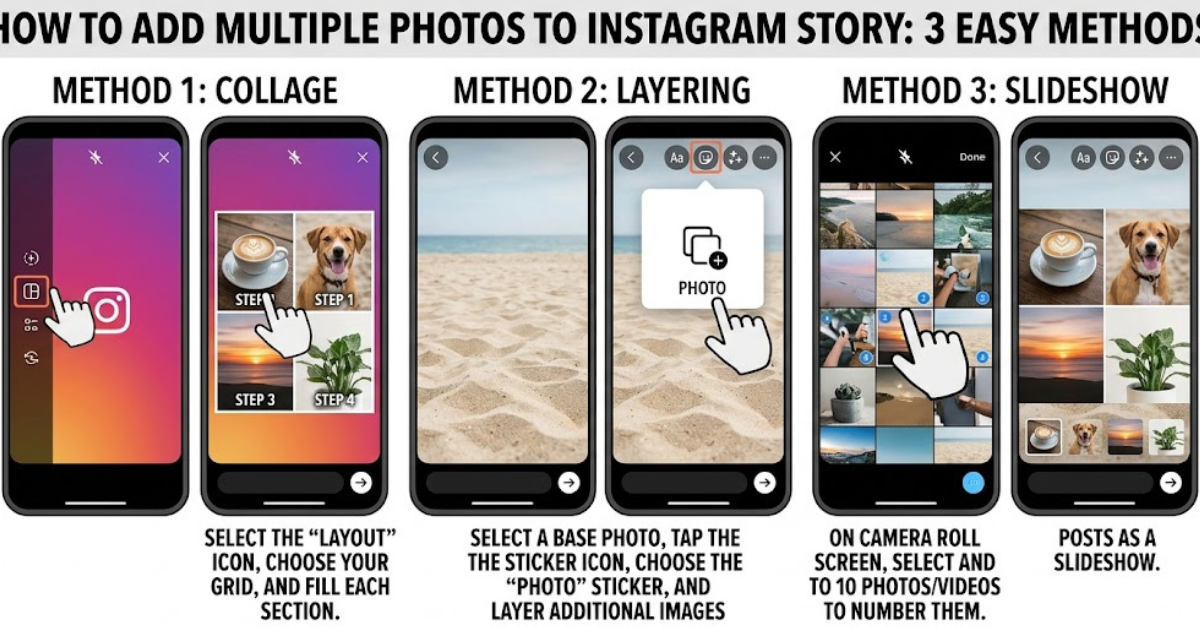
- Create a collage using Layout mode
- Paste photos manually onto one Story
- Add stickers, text, and music alongside images
The method you choose depends on your preferred style.
How to Add Multiple Photos to Instagram Story Using the Layout Feature
The Layout feature is one of the easiest ways to create a collage directly inside Instagram.
Step-by-Step Instructions
- Open Instagram and swipe right to open the Story camera.
- On the left-side toolbar, tap “Layout.”
- Choose your preferred grid layout.
- Add photos from your gallery or take pictures using the camera.
- Adjust positioning if needed.
- Tap the checkmark when finished.
- Add text, filters, or stickers if desired.
- Share the Story.
This method is perfect for clean and symmetrical collages.
How to Add Multiple Photos to One Instagram Story Manually
If you want more creative freedom, you can manually layer photos onto a single Story screen.
For iPhone Users
- Open Instagram Stories.
- Upload your background image.
- Open your Photos app.
- Copy another image.
- Return to Instagram.
- Tap “Add Sticker” when the copied image appears.
- Resize and position the photo.
- Repeat for additional images.
For Android Users
The process is slightly different on Android devices.
- Open Instagram Stories.
- Upload your first image.
- Tap the sticker icon.
- Select the “Photo” sticker.
- Choose another image from your gallery.
- Resize and place it anywhere on the Story.
- Repeat for more photos.
This method works especially well for aesthetic or scrapbook-style Stories.
How to Add Multiple Photos to Instagram Story With Music
Music can make Stories more engaging and emotional. Many users specifically search for how to add multiple photos to instagram story with music because it creates a more interactive viewing experience.
Steps to Add Music
- Create your Story using multiple photos.
- Tap the sticker icon at the top.
- Select the “Music” sticker.
- Search for a song.
- Choose the part of the song you want.
- Adjust the music display style.
- Post your Story.
You can combine music with collages, text, and animations for a more polished result.
How to Upload Multiple Photos as Separate Story Slides
Sometimes you may want each photo to appear on its own slide instead of a collage.
Steps to Upload Multiple Story Slides
- Open Instagram Stories.
- Swipe up to access your gallery.
- Tap “Select Multiple.”
- Choose the photos you want to upload.
- Edit each slide individually.
- Share all selected Stories at once.
This method is useful for event coverage, vacations, or sequential storytelling.
How to Add Multiple Photos to Instagram Story on Android
Many users search specifically for how to add multiple photos to instagram story android because Android layouts can vary slightly by device.
The good news is that Instagram’s main features are available on most Android phones.
Best Android Methods
- Use the Layout tool for quick collages
- Use the Photo sticker feature for layered images
- Upload multiple Story slides at once
- Add music stickers for interactive Stories
Keeping Instagram updated ensures all features work properly.
Creative Ideas for Multi-Photo Instagram Stories
Once you understand the basics, you can experiment with different styles.
Popular Story Ideas
- Travel memory collages
- Daily photo dumps
- Birthday countdowns
- Fitness progress updates
- Fashion outfit grids
- Mood boards
- Food collections
- Pet highlights
Creative layouts help your Stories stand out more.
Tips for Better Instagram Stories
Good design can make even simple Stories look impressive.
Use Similar Colors
Matching tones create a cleaner and more aesthetic appearance.
Avoid Overcrowding
Too many photos can make the Story difficult to view.
Add Minimal Text
Short captions often look more polished than large paragraphs.
Use High-Quality Images
Blurry photos reduce overall Story quality.
Keep It Balanced
Leave some empty space instead of filling every corner.
Common Problems and How to Fix Them
Sometimes Instagram Stories may not behave as expected.
Missing Layout Option
Update the Instagram app from your device’s app store.
Music Sticker Not Showing
The feature may not be available in some regions or account types.
Photos Appear Blurry
Make sure your images are high resolution before uploading.
App Crashes During Upload
Restart the app or clear Instagram cache on Android devices.
Why Multi-Photo Stories Are Popular
Instagram users increasingly prefer visual storytelling. Instead of posting one image at a time, multiple-photo Stories help create a more complete and engaging experience.
They also:
- Increase viewer attention
- Encourage interaction
- Make profiles look more creative
- Help organize content better
Whether you’re sharing personal moments or growing a brand, multi-photo Stories can improve engagement significantly.
FAQs
Can you add multiple photos to one Instagram Story?
Yes. Instagram allows you to add multiple photos using Layout mode or the Photo sticker feature.
How many photos can you add to an Instagram Story?
You can upload several Story slides at once or place multiple photos on a single Story screen.
Can you add music to a Story with multiple photos?
Yes. After adding your photos, you can use the Music sticker to include songs or audio clips.
Why can’t I add multiple photos to my Story?
This usually happens because the Instagram app is outdated or certain features are temporarily unavailable.
Does the multiple-photo feature work on Android?
Yes. Android users can use Layout mode, Photo stickers, and multiple slide uploads.
Is there a limit to collage photos on Instagram Stories?
Instagram’s built-in tools may limit layouts, but manual layering allows greater flexibility.
Conclusion
Learning how to add multiple photos to instagram story is one of the easiest ways to create more engaging and visually appealing content. Whether you use the Layout feature, layered photo stickers, or separate Story slides, Instagram provides several creative options for sharing multiple moments at once.
Adding music, text, and balanced designs can make your Stories feel even more polished and interactive. With the tips and methods covered in this guide, you can create Stories that look professional, aesthetic, and attention-grabbing without needing advanced editing skills.
Leave a Reply